Granulation Block
6 equipment- Running
- 4
- Idle
- 1
- Stopped
- 0
- Alarm
- 1
- Offline
- 0
1 active alarm records · 100% connected

RetroN21 helps manufacturers and equipment OEMs connect new and existing production equipment, strengthen machine-level data integrity and support compliance. Bring controlled data, user access, audit trails and electronic records into new machine designs or equipment already in operation.
Built around your equipment. Configured for your process.
Compliance depends on validated implementation and operational controls.
Acquire · Control · Archive · Analyze
Gain a unified view of your manufacturing operations with RetroN21. Monitor equipment status, production activity, operating parameters, and alarms across your facility from a centralized interface.
Local demonstration · Illustrative data. This fictional plant scenario explains the supervision workflow. Interface images are design concepts; available functions depend on the agreed configuration.
JavaScript is required to change supervision views, run the tour or simulate equipment. You can review the plant snapshot below and open the full-size interface concept.
Explore operating states, production areas and active batch assignments.
Communication availability = connected equipment ÷ total equipment. This is a sample connection metric, not OEE. Alarm-state equipment is held for attention; stopped equipment is a separate operating state.
1 active alarm records · 100% connected
0 active alarm records · 100% connected
2 active alarm records · 100% connected
0 active alarm records · 67% connected
| Equipment | Block | Product / batch | Batch status |
|---|---|---|---|
| V-Blender / VB094 | Granulation Block | Paracetamol 500 mg BATCH-VB094 | In progress |
| Fluid bed dryer / FBD0014 | Granulation Block | Metformin 500 mg BATCH-FBD0014 | On hold / alarm |
| Rapid mix granulator / BLR-MIXER-13 | Granulation Block | Amlodipine 5 mg BATCH-BLR-MIXER-13 | In progress |
| Fluid bed dryer / BLR-DRYER-15 | Granulation Block | Paracetamol 500 mg BATCH-BLR-DRYER-15 | In progress |
| Rapid mix granulator / BLR-MIXER-16 | Granulation Block | Metformin 500 mg BATCH-BLR-MIXER-16 | In progress |
| Rotary tablet press / BLR-PRESS-21 | Compression Block | Amlodipine 5 mg BATCH-BLR-PRESS-21 | In progress |
| Rotary tablet press / BLR-PRESS-22 | Compression Block | Paracetamol 500 mg BATCH-BLR-PRESS-22 | In progress |
| Rotary tablet press / BLR-PRESS-24 | Compression Block | Metformin 500 mg BATCH-BLR-PRESS-24 | In progress |
| Rotary tablet press / BLR-PRESS-25 | Compression Block | Amlodipine 5 mg BATCH-BLR-PRESS-25 | In progress |
| Rotary tablet press / BLR-PRESS-26 | Compression Block | Paracetamol 500 mg BATCH-BLR-PRESS-26 | In progress |
| Coating pan / BLR-COATER-31 | Coating Block | Metformin 500 mg BATCH-BLR-COATER-31 | In progress |
| Coating pan / BLR-COATER-32 | Coating Block | Amlodipine 5 mg BATCH-BLR-COATER-32 | On hold / alarm |
| Coating pan / BLR-COATER-35 | Coating Block | Paracetamol 500 mg BATCH-BLR-COATER-35 | In progress |
| Coating pan / BLR-COATER-36 | Coating Block | Metformin 500 mg BATCH-BLR-COATER-36 | In progress |
| Packing line / BLR-PACKER-41 | Packing Block | Amlodipine 5 mg BATCH-BLR-PACKER-41 | In progress |
| Packing line / BLR-PACKER-44 | Packing Block | Paracetamol 500 mg BATCH-BLR-PACKER-44 | In progress |
Optional local simulation
Default sample data stays fixed. Each simulated tick advances the scenario by 30 seconds; nothing connects to production.
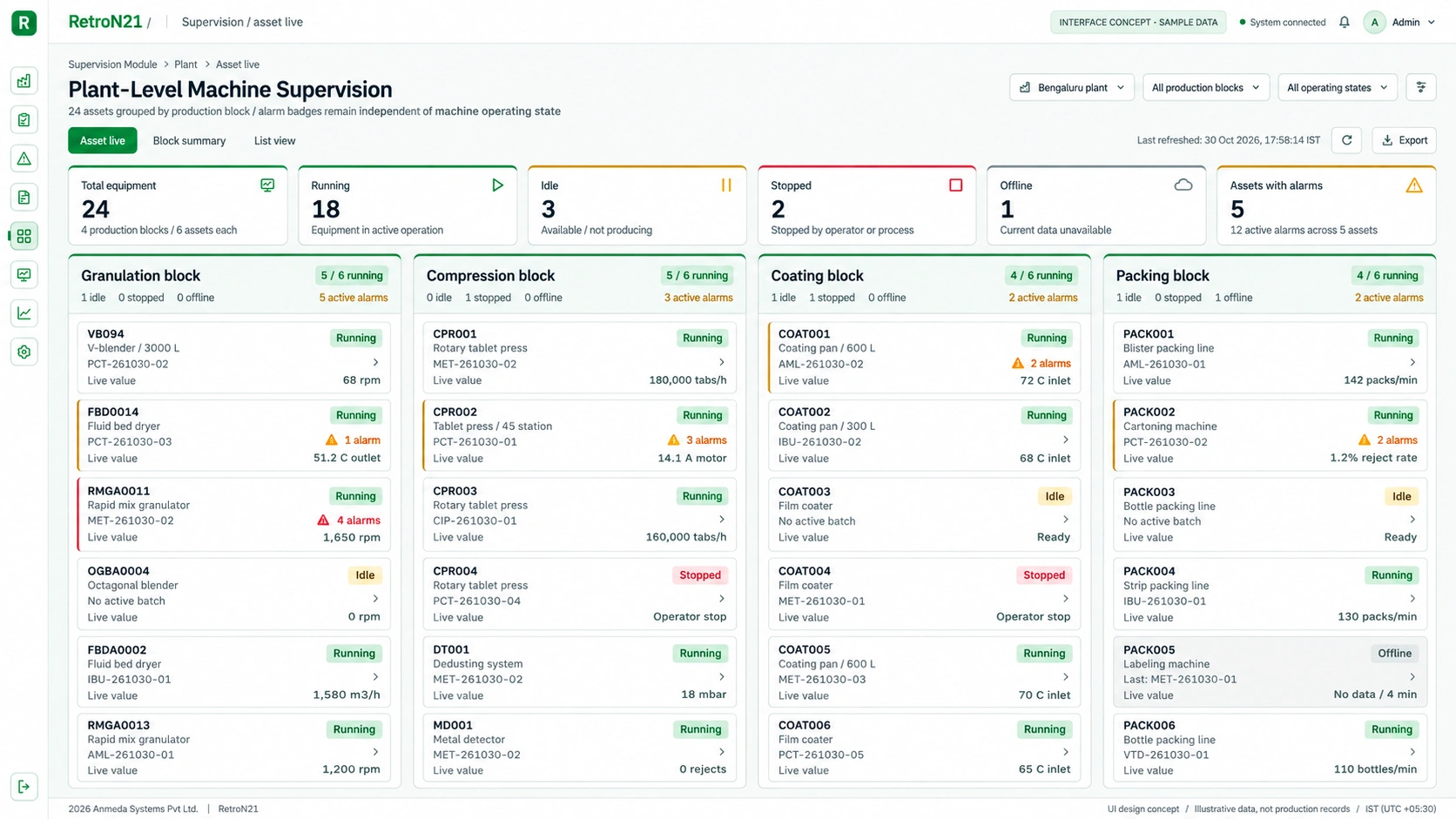 Open full-screen image ↗
Plant monitoring brings equipment operating states, alarm context and active production information into a shared view for manufacturing operations visibility.
Explore equipment by production area, filter machine states and inspect batch assignments. Industrial digitalization connects the plant view with equipment context.
Explore sample parameters, trends and alarms to understand how production monitoring software can present the information behind individual machines.
Standalone equipment, local records and disconnected production systems can make it difficult to maintain consistent controls, investigate events and prepare reliable information for operational and regulatory review.
Production information remains locked within individual machines.
Operators depend on paper logs, spreadsheets or manual transcription.
Local or shared accounts make accountability difficult.
Changes and operator activities may not be consistently traceable.
Production information must be manually collected from multiple sources.
Teams cannot easily monitor equipment status, alarms and performance centrally.
What if new and existing production equipment could become part of one controlled digital environment?
Let Anmeda assess your equipment or OEM machine design and demonstrate how RetroN21 can connect systems, strengthen data controls and improve operational visibility.
Connect machine information with the controls and context your teams need.
Connect new and existing PLC/HMI-based production equipment to a centralized platform. OEMs can incorporate this approach into machine designs; interfaces and additional data sources are assessed for integration.
Apply centralized user management with hierarchical, machine-based and restricted role-based access.
Capture user activity in integrated audit trails and support electronic records, signatures and controlled report approvals.
Centralized production-data acquisition and archival can support historian and trend-visualization requirements, subject to the agreed configuration.
Bring alarm and event information together, including acknowledgment with electronic signatures, to support investigation and response.
Use a centralized data platform for machine analytics and paperless report generation, verification and approval workflows.
Interfaces, timestamps, historian features and visualization scope are confirmed during assessment. Capabilities depend on the connected equipment and configured solution.
Connected operations
RetroN21 supports the structured digitization of new and existing equipment through a scope defined around the machine, process, users and applicable requirements.
Controls can be configured subject to agreed scope, with validation aligned to customer requirements.
Whether designing a new machine, commissioning a production line or integrating equipment already in use, RetroN21 helps manufacturers and OEMs introduce coordinated data, access and electronic controls.
Every manufacturing operation has a different technology landscape, regulatory environment and level of digital maturity. Anmeda helps organizations build a practical transformation plan—from connecting new and existing equipment to creating secure, compliant and actionable manufacturing intelligence.
Evaluate equipment, systems, data availability, workflows, infrastructure and compliance requirements.
Identify high-value use cases and create a phased digitalization plan aligned with business objectives.
Integrate machines, PLCs, HMIs, instruments, SCADA and approved plant-floor data sources.
Introduce structured workflows, centralized data, access controls, audit trails and electronic records.
Configure, test, document and deploy the solution within the customer’s quality and validation framework.
Apply dashboards, trends, alarms and analytics, then expand successful solutions across equipment, plants and sites.
Start with the right business problem, demonstrate value through a focused implementation and scale with confidence.
Put electronic controls in context: the configured system, the process and the people who operate it.
Supports implementation of applicable electronic-record, electronic-signature and access controls. Specific requirements must be assessed for the intended use.
Can support controlled computerized-system practices through appropriately configured access, records and audit trails.
Data capture, user accountability and archival can support ALCOA+ objectives within the customer’s data-governance framework.
Implementation can follow an agreed risk-based lifecycle approach. Confirm the required deliverables with Anmeda.
Can be configured, tested and documented within the customer’s approved validation framework.
Regulatory compliance depends on product configuration, validated implementation, operating procedures, infrastructure and the customer’s quality-management system.
Build a path from equipment data to controlled information and approved enterprise applications.
Conceptual architecture. *Can be assessed for the intended integration or configuration; availability requires confirmation. All connections depend on approved interfaces and project scope.
Give manufacturers, equipment OEMs, engineering and quality teams a more useful view of equipment data and controls.
Introduce electronic controls when commissioning new equipment or upgrading machines already in operation.
Acquire and archive information from connected equipment.
Can support history and trending needs through an agreed configuration.
Review alarms, events and acknowledgments centrally.
Support paperless reporting, verification and approval.
Can be assessed for your equipment; availability and control scope require confirmation.
Bring production information together across equipment and plants.
Connect to approved applications around a defined integration scope.
Incorporate user access, audit trails and electronic records into machine designs, with configuration and validation aligned to the customer’s requirements.
Compare selected equipment, batches and historical operating periods to identify variations, recurring conditions and performance patterns.
Contextualize equipment and production data to review cycle times, delays, downtime and other agreed operational-efficiency indicators.
Support phased expansion across equipment, production lines and manufacturing locations using standardized configurations, controls, dashboards and reporting.
Talk to Anmeda about incorporating data integrity and electronic controls into new equipment, OEM machine designs or existing production systems. Build a secure, controlled digital environment around your equipment and process.
RetroN21 is Anmeda’s industrial digitization and machine-level data-management platform. It helps manufacturers and equipment OEMs connect new and existing production equipment to centralized data, user controls, audit trails and reporting.
No. RetroN21 can support new equipment, existing machines and legacy systems. Manufacturers can use it across their equipment landscape, and OEMs can incorporate its software and approach into new machine designs. Integration depends on the equipment interfaces, available data and required controls.
OEMs can use RetroN21 software and its integration approach to enable user access controls, audit trails, electronic records and data-management capabilities in their equipment. The implementation should be configured, tested and documented against the machine’s intended use and the customer’s compliance requirements.
Its approach is to use and enhance the capabilities of existing PLCs and HMIs where practical. Hardware or interface changes may still be required depending on the equipment assessment.
It supports user and access management, integrated audit trail reporting, electronic signatures, data acquisition and archival. Effective data integrity also depends on configuration, procedures and system operation.
The product documentation describes third-party integration, including ERP, eBRM, BMS and utility-management systems. Other applications and interfaces should be agreed during assessment.
The brochure describes line servers and a central server connected to production equipment. Confirm the proposed on-premises architecture, infrastructure and supported deployment options with Anmeda.
No. Software alone does not establish compliance. The intended use, configuration, validated implementation, operating procedures, infrastructure and customer quality-management system must be assessed together.
The proposed journey begins with an equipment assessment, followed by connectivity, data capture and control configuration. Agree the validation scope, test evidence, documentation and acceptance criteria with Anmeda before deployment.
Assess intended use, risk, configured functionality and evidence within the customer’s quality system and agreed project scope.